Elements of a Strauss Sonification
Strauss makes use of a number of internal Classes to produce the output audio. These handle broadly different aspects of the sonification process. For more in-depth documentation see the Detailed Documentation.
Briefly, a Source represents the data and the mapping of its variables onto aspects of sound. This is taken by the Score which defines any constraints on what notes or sounds can be generated at a given time. A Generator object then generates these notes and sounds as an audio signal, including any mapping of Source properties to expressive properties of sound. These audio signals are then consolidated by the output Channels, object according to any spatialisation (e.g. source position) and choice of audio system (mono, stereo, 5.1, etc).
This processing is all handled inside the Sonification class, which can render and output the audio. This scheme is illustrated by the figure below.
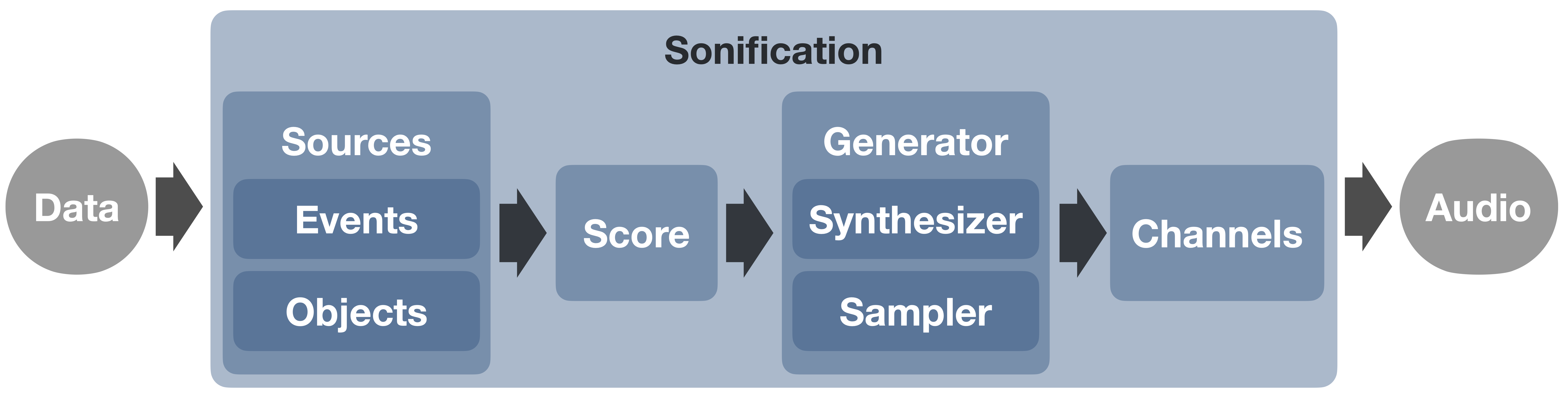
Figure: Basic flow of the Strauss code, from input data to output audio.
We include further descriptions below, with linked examples, which are hosted in your browser via Google’s Colab platform.
Source Class
The Source classes in Strauss are so named because they act as sources of sound in the sonification. Sources are used to represent the input data, by mapping this data to properties of sound (volume, position, frequency, etc). The choice of how to set up the sources depends on the data being sonified, and what the user wants to convey. For this, Strauss defines two generic classes that inherit the parent Source class; Events and Objects, described below.
Events
The Events source class is suited to represent data that can be characterised by an occurence time.
In this case, sounds are triggered over the duration of the sonification, with properties of each discrete event (e.g. brightness, size, etc.) mapped to properties of sound (e.g. volume, pitch, etc). Events will therefore typically be defined by single values, including a time variable, else all events will occur at the start of the sonification.
Note
Some examples of Events in scientific data could be; stars forming, supernovae explosions, particle detections, lightning strikes, website interactions, etc…, an example of the Events source type is the ‘Stars Appearing’ example.
Objects
The Objects source class is suited to represent data that evolves continuosly over time.
In this case, sound is produced continuously by the source, with the evolving properties of the object (e.g. position, brightness, mass, etc) mapped to properties of the sound (e.g. panning, volume, pitch). Objects will therefore typically each be defined by arrays of values, and a corresponding time_evo array, indicating when the measurements are taken.
Note
Some examples of Objects in scientific data could be; A galaxy evolving, planets orbiting, a plant growing, a glacier flowing, a climate changing etc… an instance of the Objects source type is seen in the 1D sonification example.
Score Class
With the audio Sources defined, the Score class allows us to place ‘musical’ constraints on the sound they produce to represent the underlying data. The duration of the output sonification is also specified via the Score with the timeline of the sonification scaled to fit this duration. The musical use of the score is demonstrated in examples such as this or this
Generator Class
The Generator class takes instruction from the two prior classes and generates audio for each individual source. This can be achieved using either the Sampler or Synthesiser child classes (along with the Spectraliser special case), detailed below, with some applied examples.
Sampler
This class generates audio by triggering pre-recorded audio samples.
A directory of audio files is used to specify which sample to use for each note of the sampler. These samples are loaded into the sampler and are interpolated to allow arbitrary pitch shifting. Samples can also be looped in a number of ways to allow notes to sustain perpetually. Alternatively, a sound-font (.sf2) file can be read in, mapping samples to notes automatically The ‘Stars Appearing’ example exemplifies using curated samples paackaged with Strauss, while the ‘Light Curve Soundfonts’ example demonstrates using a sound-font.
Synthesiser
This class instead generates audio additively using mathematical functions via an arbitrary number of oscillators. The strauss synthesiser supports a number of oscillator forms. This is exemplified in the the 1D data example.
Spectraliser
A special case of the Synthesiser, this generator synthesises sound from an input spectrum, via an inverse Fast Fourier Transform (IFFT), with randomised phases. The user can specify the audible frequency range that the ‘spectralised’ audio is mapped over. The spectraliser is used in this example.
Channels Class
Once sound has been produced for each :code: source, the final step is to mix the audio down into some multi-channel audio format. The Channels class essentially represents a bank of virtual microphones, with 3D antennae patterns, that each correspond to a channel in the output file. The ‘Stars Appearing’ example discuss different choices of channel set-up.
Sonification Class
The top-level Sonification class loads in all the above classes and produces the final sonification. Once Sources, Score, Generator and Channels classes are defined, the Sonification class is invoked. The render() method can then be run to produce the sonification.